Overview
Many organizations publish statistical indicators derived from survey data (unemployment rates, poverty rates, innovation metrics) without disclosing how those indicators were computed. The final number is public, but the methodology – which variables were used, what transformations were applied, what survey design was used – remains opaque.
metasurvey solves this by separating private data from public methodology. You can deploy the metasurvey API on your own infrastructure where:
- Microdata stays private: raw survey files never leave your network.
- Indicators are public: computed results (point estimates, standard errors, confidence intervals) are served via the API.
- Methodology is transparent: anyone can query the recipe (data transformation steps) and the workflow (estimation calls and survey design) that produced each indicator.
The traceability chain is:
Indicator                Workflow                    Recipe
(the number)      -->    (how it was estimated)  --> (how variables were built)
value: 0.082             svymean(~pd, design)        step_compute(svy, pd = ...)
se: 0.003                estimation_type: annual     step_recode(svy, pea, ...)
cv: 0.037                recipe_ids: [ech_emp_001]   depends_on: [e27, f66, ...]
Architecture
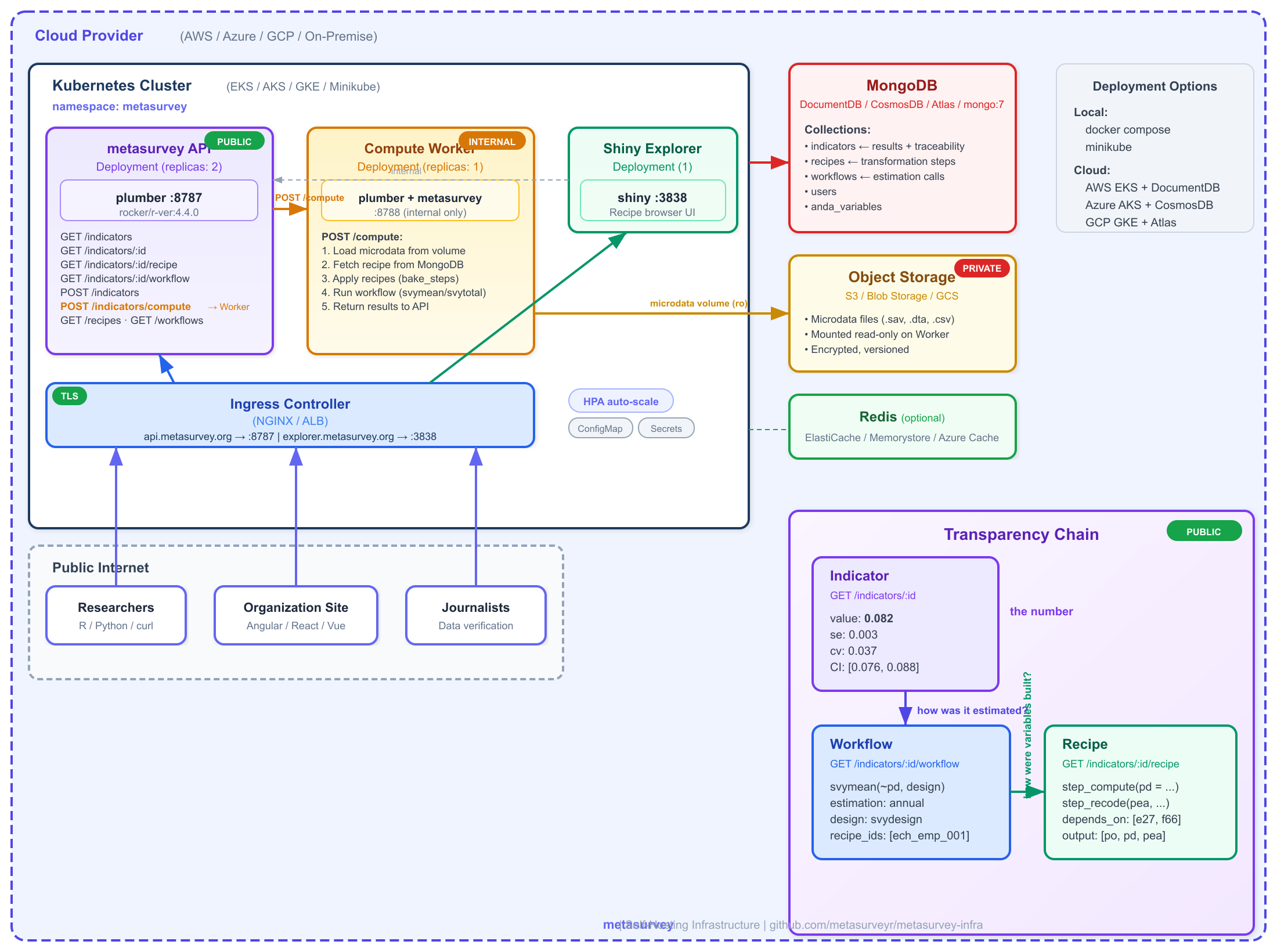
The system has two R services: a public API that serves indicators and their traceability, and a private Worker that has metasurvey installed and access to microdata. The worker is the only component that touches raw survey data.
metasurvey self-hosting infrastructure
Key separation: The Worker loads microdata, fetches
recipes from MongoDB, applies them (bake_steps), runs the
estimation (workflow), and posts the result back to the
API. The public API never touches microdata – it only serves
pre-computed indicators and their traceability.
The frontend can also request on-demand computations
with filters (e.g., “unemployment rate for women in Montevideo”) via
POST /indicators/compute, which the API proxies to the
Worker.
Quick Start with Docker Compose
The repository includes a docker-compose.yml that starts
MongoDB, the plumber API, and the Shiny recipe explorer. No external
database required.
2. Start the stack
This starts four services:
| Service | URL | Description |
|---|---|---|
mongo |
localhost:27017 |
MongoDB 7 with persistent volume |
worker |
localhost:8788 |
Compute worker (internal only) |
api |
http://localhost:8787 |
Plumber REST API |
shiny |
http://localhost:3838 |
Recipe explorer |
3. Initialize the database
# Create collections and indexes
docker compose exec mongo mongosh \
  -u metasurvey -p change-me-in-production \
  --authenticationDatabase admin \
  metasurvey /dev/stdin < inst/scripts/setup_mongodb.js

# Seed example recipes, workflows, and indicators
docker compose exec api Rscript -e '
  Sys.setenv(
    METASURVEY_MONGO_URI = "mongodb://metasurvey:change-me-in-production@mongo:27017/?authSource=admin"
  )
  source("/app/seed_ech_recipes.R")
'Computing and Publishing Indicators
The typical flow: load survey data, apply a recipe, run a workflow, and publish the result as an indicator with full traceability.
library(metasurvey)

# 1. Load survey data (private -- stays on your server)
svy <- Survey$new(
  data = my_survey_data,
  edition = "2024",
  type = "ech",
  engine = "data.table",
  weight = add_weight(annual = "W_ANO")
)

# 2. Apply a recipe (defines variables like unemployment status)
svy <- step_compute(svy,
  pd = data.table::fcase(
    pobpcoac == 2, 1L,
    pobpcoac %in% c(1, 3), 0L
  ),
  comment = "Unemployed: POBPCOAC == 2"
)
svy <- bake_steps(svy)

# 3. Run the estimation (workflow)
result <- workflow(
  svy = list(svy),
  survey::svymean(~pd, na.rm = TRUE),
  estimation_type = "annual"
)

# result is a data.table:
#       stat      value     se     cv
# svymean: pd    0.082  0.003  0.037
Now publish the indicator to the API:
# Connect to your local API
configure_api("http://localhost:8787")
api_login("admin@example.com", "your-password")

# Build the indicator payload
indicator <- list(
  name = "Unemployment Rate 2024",
  description = "Annual unemployment rate, population 14+",
  recipe_id = "ech_employment_001",
  workflow_id = "ech_wf_labor",
  survey_type = "ech",
  edition = "2024",
  estimation_type = "annual",
  stat = result$stat[1],
  value = result$value[1],
  se = result$se[1],
  cv = result$cv[1],
  confint_lower = result$confint_lower[1],
  confint_upper = result$confint_upper[1],
  metadata = list(
    formula = "~pd",
    estimation_function = "svymean"
  )
)

# Publish (requires authentication)
resp <- httr2::request("http://localhost:8787/indicators") |>
  httr2::req_headers(
    Authorization = paste("Bearer", Sys.getenv("METASURVEY_TOKEN"))
  ) |>
  httr2::req_body_json(indicator) |>
  httr2::req_perform()

httr2::resp_body_json(resp)
# {ok: true, id: "ind_1708099200_42"}
Consuming Indicators (Transparency)
Once published, indicators and their full methodology are accessible without authentication. This is the transparency layer.
Get the workflow (how it was estimated)
{
  "ok": true,
  "indicator_id": "ind_ech_unemployment_2024",
  "workflow": {
    "id": "ech_wf_labor",
    "name": "Mercado Laboral ECH",
    "estimation_type": "annual",
    "recipe_ids": ["ech_pobpcoac_000", "ech_employment_001"],
    "calls": [
      "svymean(~pea, design, na.rm=TRUE)",
      "svymean(~po, design, na.rm=TRUE)",
      "svymean(~pd, design, na.rm=TRUE)"
    ],
    "call_metadata": [
      {
        "type": "svymean",
        "formula": "~pea",
        "description": "Tasa de actividad"
      },
      {
        "type": "svymean",
        "formula": "~pd",
        "description": "Tasa de desempleo"
      }
    ]
  }
}
The workflow tells you what statistical function was
used (svymean), what formula
(~pd), and which recipes were applied to
the data before estimation.
Get the recipe (how variables were built)
{
  "ok": true,
  "indicator_id": "ind_ech_unemployment_2024",
  "recipe": {
    "id": "ech_employment_001",
    "name": "Employment Status",
    "steps": [
      "step_compute(svy, po = fcase(pobpcoac == 1, 1L, TRUE, 0L), comment = 'Employed')",
      "step_compute(svy, pd = fcase(pobpcoac == 2, 1L, TRUE, 0L), comment = 'Unemployed')",
      "step_compute(svy, pea = fcase(pobpcoac %in% 1:2, 1L, TRUE, 0L), comment = 'EAP')"
    ],
    "depends_on": ["pobpcoac"],
    "doc": {
      "input_variables": ["pobpcoac"],
      "output_variables": ["po", "pd", "pea"],
      "pipeline": [
        {"step": 1, "type": "compute", "outputs": ["po"]},
        {"step": 2, "type": "compute", "outputs": ["pd"]},
        {"step": 3, "type": "compute", "outputs": ["pea"]}
      ]
    }
  }
}
The recipe tells you exactly how each variable was constructed from the original survey variables. Combined with the workflow, anyone can verify the full computation chain without accessing the microdata.
Indicator API Reference
| Method | Endpoint | Auth | Description |
|---|---|---|---|
GET |
/indicators |
No | List and search published indicators |
GET |
/indicators/:id |
No | Get a single indicator with metadata |
GET |
/indicators/:id/recipe |
No | Get the recipe that built the variables |
GET |
/indicators/:id/workflow |
No | Get the workflow (estimation + design) |
POST |
/indicators |
Yes | Publish a computed indicator |
POST |
/indicators/compute |
Yes | On-demand estimation via the Worker (with filters) |
Query parameters for GET /indicators
| Parameter | Type | Description |
|---|---|---|
search |
string | Regex search on indicator name |
survey_type |
string | Filter by survey type |
recipe_id |
string | Filter by recipe ID |
workflow_id |
string | Filter by workflow ID |
edition |
string | Filter by survey edition |
limit |
integer | Max results (default 50) |
offset |
integer | Skip N results (default 0) |
Indicator document fields
| Field | Type | Required | Description |
|---|---|---|---|
id |
string | Auto | Unique identifier |
name |
string | Yes | Indicator name |
workflow_id |
string | Yes | Workflow that produced it |
value |
number | Yes | Point estimate |
recipe_id |
string | No | Recipe that built variables |
description |
string | No | Human-readable description |
survey_type |
string | No | Survey type |
edition |
string | No | Survey edition |
estimation_type |
string | No |
annual, quarterly,
monthly
|
stat |
string | No | Statistic label (e.g., svymean: pd) |
se |
number | No | Standard error |
cv |
number | No | Coefficient of variation |
confint_lower |
number | No | Lower bound of confidence interval |
confint_upper |
number | No | Upper bound of confidence interval |
metadata |
object | No | Additional context (formula, notes) |
published_at |
string | Auto | ISO timestamp |
Deploying with Minikube
For Kubernetes-based deployment, you can test locally with Minikube.
MongoDB deployment
# k8s/mongo.yaml
apiVersion: apps/v1
kind: Deployment
metadata:
  name: metasurvey-mongo
  namespace: metasurvey
spec:
  replicas: 1
  selector:
    matchLabels:
      app: metasurvey-mongo
  template:
    metadata:
      labels:
        app: metasurvey-mongo
    spec:
      containers:
        - name: mongo
          image: mongo:7
          ports:
            - containerPort: 27017
          env:
            - name: MONGO_INITDB_ROOT_USERNAME
              value: metasurvey
            - name: MONGO_INITDB_ROOT_PASSWORD
              valueFrom:
                secretKeyRef:
                  name: metasurvey-secrets
                  key: mongo-password
---
apiVersion: v1
kind: Service
metadata:
  name: mongo-service
  namespace: metasurvey
spec:
  selector:
    app: metasurvey-mongo
  ports:
    - port: 27017
      targetPort: 27017
Worker deployment
# k8s/worker.yaml
apiVersion: apps/v1
kind: Deployment
metadata:
  name: metasurvey-worker
  namespace: metasurvey
spec:
  replicas: 1
  selector:
    matchLabels:
      app: metasurvey-worker
  template:
    metadata:
      labels:
        app: metasurvey-worker
    spec:
      containers:
        - name: worker
          image: ghcr.io/metasurveyr/metasurvey-worker:latest
          ports:
            - containerPort: 8788
          env:
            - name: METASURVEY_MONGO_URI
              value: "mongodb://metasurvey:$(MONGO_PASSWORD)@mongo-service:27017/?authSource=admin"
            - name: MONGO_PASSWORD
              valueFrom:
                secretKeyRef:
                  name: metasurvey-secrets
                  key: mongo-password
          volumeMounts:
            - name: survey-data
              mountPath: /data/surveys
              readOnly: true
          resources:
            requests:
              memory: "1Gi"
              cpu: "500m"
            limits:
              memory: "4Gi"
              cpu: "2000m"
      volumes:
        - name: survey-data
          persistentVolumeClaim:
            claimName: survey-microdata-pvc
---
apiVersion: v1
kind: Service
metadata:
  name: worker-service
  namespace: metasurvey
spec:
  selector:
    app: metasurvey-worker
  ports:
    - port: 8788
      targetPort: 8788
API deployment
# k8s/api.yaml
apiVersion: apps/v1
kind: Deployment
metadata:
  name: metasurvey-api
  namespace: metasurvey
spec:
  replicas: 2
  selector:
    matchLabels:
      app: metasurvey-api
  template:
    metadata:
      labels:
        app: metasurvey-api
    spec:
      containers:
        - name: api
          image: ghcr.io/metasurveyr/metasurvey-api:latest
          ports:
            - containerPort: 8787
          env:
            - name: METASURVEY_MONGO_URI
              value: "mongodb://metasurvey:$(MONGO_PASSWORD)@mongo-service:27017/?authSource=admin"
            - name: MONGO_PASSWORD
              valueFrom:
                secretKeyRef:
                  name: metasurvey-secrets
                  key: mongo-password
            - name: METASURVEY_JWT_SECRET
              valueFrom:
                secretKeyRef:
                  name: metasurvey-secrets
                  key: jwt-secret
            - name: METASURVEY_WORKER_URL
              value: "http://worker-service:8788"
          livenessProbe:
            httpGet:
              path: /health
              port: 8787
            initialDelaySeconds: 30
          readinessProbe:
            httpGet:
              path: /health
              port: 8787
            initialDelaySeconds: 10
          resources:
            requests:
              memory: "512Mi"
              cpu: "250m"
            limits:
              memory: "1Gi"
              cpu: "500m"
---
apiVersion: v1
kind: Service
metadata:
  name: metasurvey-api
  namespace: metasurvey
spec:
  type: NodePort
  selector:
    app: metasurvey-api
  ports:
    - port: 8787
      targetPort: 8787
Apply and test
kubectl create namespace metasurvey

kubectl create secret generic metasurvey-secrets \
  --namespace metasurvey \
  --from-literal=mongo-password=change-me \
  --from-literal=jwt-secret=change-me

kubectl apply -f k8s/mongo.yaml -f k8s/worker.yaml -f k8s/api.yaml

# Access the API
minikube service metasurvey-api -n metasurvey
Deploying on AWS (EKS)
For production on AWS, use EKS with DocumentDB (MongoDB compatible) as the managed database.
2. Create DocumentDB (MongoDB compatible)
aws docdb create-db-cluster \
  --db-cluster-identifier metasurvey-db \
  --engine docdb \
  --master-username metasurvey_admin \
  --master-user-password "$DB_PASSWORD" \
  --vpc-security-group-ids "$SG_ID" \
  --db-subnet-group-name "$SUBNET_GROUP"

aws docdb create-db-instance \
  --db-instance-identifier metasurvey-db-1 \
  --db-cluster-identifier metasurvey-db \
  --db-instance-class db.r6g.large \
  --engine docdb
3. Configure secrets in Kubernetes
aws eks update-kubeconfig --name metasurvey-prod --region sa-east-1

kubectl create namespace metasurvey

kubectl create secret generic metasurvey-secrets \
  --namespace metasurvey \
  --from-literal=mongo-uri="mongodb://metasurvey_admin:$DB_PASSWORD@metasurvey-db.cluster-xxx.sa-east-1.docdb.amazonaws.com:27017/?tls=true&tlsCAFile=/rds-combined-ca-bundle.pem&retryWrites=false" \
  --from-literal=jwt-secret="$(openssl rand -hex 32)"
4. Deployment with ALB Ingress
# k8s/aws-api.yaml
apiVersion: apps/v1
kind: Deployment
metadata:
  name: metasurvey-api
  namespace: metasurvey
spec:
  replicas: 2
  selector:
    matchLabels:
      app: metasurvey-api
  template:
    metadata:
      labels:
        app: metasurvey-api
    spec:
      containers:
        - name: api
          image: ghcr.io/metasurveyr/metasurvey-api:latest
          ports:
            - containerPort: 8787
          env:
            - name: METASURVEY_MONGO_URI
              valueFrom:
                secretKeyRef:
                  name: metasurvey-secrets
                  key: mongo-uri
            - name: METASURVEY_JWT_SECRET
              valueFrom:
                secretKeyRef:
                  name: metasurvey-secrets
                  key: jwt-secret
            - name: METASURVEY_WORKER_URL
              value: "http://worker-service:8788"
          resources:
            requests:
              memory: "512Mi"
              cpu: "250m"
            limits:
              memory: "1Gi"
              cpu: "500m"
          livenessProbe:
            httpGet:
              path: /health
              port: 8787
            initialDelaySeconds: 30
          readinessProbe:
            httpGet:
              path: /health
              port: 8787
            initialDelaySeconds: 10
---
apiVersion: v1
kind: Service
metadata:
  name: metasurvey-api
  namespace: metasurvey
spec:
  type: ClusterIP
  selector:
    app: metasurvey-api
  ports:
    - port: 8787
---
apiVersion: networking.k8s.io/v1
kind: Ingress
metadata:
  name: metasurvey-ingress
  namespace: metasurvey
  annotations:
    kubernetes.io/ingress.class: alb
    alb.ingress.kubernetes.io/scheme: internet-facing
    alb.ingress.kubernetes.io/target-type: ip
    alb.ingress.kubernetes.io/certificate-arn: "$ACM_CERT_ARN"
    alb.ingress.kubernetes.io/listen-ports: '[{"HTTPS":443}]'
spec:
  rules:
    - host: api.metasurvey.example.org
      http:
        paths:
          - path: /
            pathType: Prefix
            backend:
              service:
                name: metasurvey-api
                port:
number: 8787Deploying on Azure (AKS)
For production on Azure, use AKS with CosmosDB (MongoDB API) as the managed database.
2. Create CosmosDB with MongoDB API
az cosmosdb create \
  --name cosmos-metasurvey \
  --resource-group rg-metasurvey \
  --kind MongoDB \
  --capabilities EnableMongo \
  --default-consistency-level Session \
  --locations regionName=brazilsouth

# Get connection string
COSMOS_URI=$(az cosmosdb keys list \
  --name cosmos-metasurvey \
  --resource-group rg-metasurvey \
  --type connection-strings \
--query "connectionStrings[0].connectionString" -o tsv)4. Deployment with NGINX Ingress
# k8s/azure-api.yaml
apiVersion: apps/v1
kind: Deployment
metadata:
  name: metasurvey-api
  namespace: metasurvey
spec:
  replicas: 2
  selector:
    matchLabels:
      app: metasurvey-api
  template:
    metadata:
      labels:
        app: metasurvey-api
    spec:
      containers:
        - name: api
          image: ghcr.io/metasurveyr/metasurvey-api:latest
          ports:
            - containerPort: 8787
          env:
            - name: METASURVEY_MONGO_URI
              valueFrom:
                secretKeyRef:
                  name: metasurvey-secrets
                  key: mongo-uri
            - name: METASURVEY_JWT_SECRET
              valueFrom:
                secretKeyRef:
                  name: metasurvey-secrets
                  key: jwt-secret
            - name: METASURVEY_WORKER_URL
              value: "http://worker-service:8788"
          resources:
            requests:
              memory: "512Mi"
              cpu: "250m"
            limits:
              memory: "1Gi"
              cpu: "500m"
          livenessProbe:
            httpGet:
              path: /health
              port: 8787
            initialDelaySeconds: 30
          readinessProbe:
            httpGet:
              path: /health
              port: 8787
            initialDelaySeconds: 10
---
apiVersion: v1
kind: Service
metadata:
  name: metasurvey-api
  namespace: metasurvey
spec:
  type: ClusterIP
  selector:
    app: metasurvey-api
  ports:
    - port: 8787
---
apiVersion: networking.k8s.io/v1
kind: Ingress
metadata:
  name: metasurvey-ingress
  namespace: metasurvey
  annotations:
    cert-manager.io/cluster-issuer: letsencrypt-prod
    nginx.ingress.kubernetes.io/ssl-redirect: "true"
spec:
  ingressClassName: nginx
  tls:
    - hosts:
        - api.metasurvey.example.org
      secretName: metasurvey-tls
  rules:
    - host: api.metasurvey.example.org
      http:
        paths:
          - path: /
            pathType: Prefix
            backend:
              service:
                name: metasurvey-api
                port:
                  number: 8787
# Install NGINX Ingress Controller
helm repo add ingress-nginx https://kubernetes.github.io/ingress-nginx
helm install ingress-nginx ingress-nginx/ingress-nginx \
--namespace ingress-nginx --create-namespace
# Install cert-manager for TLS
helm repo add jetstack https://charts.jetstack.io
helm install cert-manager jetstack/cert-manager \
--namespace cert-manager --create-namespace \
--set crds.enabled=true
kubectl apply -f k8s/azure-api.yamlFeature Flags
The API supports feature flags via environment variables to control which modules are available. This lets you run the same API image in different configurations:
| Variable | Default | Description |
|---|---|---|
METASURVEY_ENABLE_INDICATORS |
1 |
Enable /indicators endpoints |
METASURVEY_ENABLE_WORKER |
0 |
Enable POST /indicators/compute (on-demand) |
For example, the public metasurvey API on Railway only serves recipes and workflows – indicators and worker are disabled:
A self-hosted deployment with full capabilities:
Hybrid Deployment: Public Registry + Private Infrastructure
You don’t need to run your own MongoDB to access shared recipes. You can deploy your own API + Worker pointing to the public metasurvey recipe registry, so that researchers with access to microdata can apply community-published recipes locally.
The organization deploys two services:
-
plumber API (
:8787) – connects to the public MongoDB to read recipes and workflows. Receives requests from the frontend or researchers, and proxies compute requests to the worker. -
Worker (
:8788) – has metasurvey installed and access to private microdata. Fetches recipes from the public registry (via MongoDB), applies them, and runs estimations.
  Public metasurvey MongoDB             Your infrastructure
  (recipes, workflows)                  (private network)
  +-------------------+           +---------------------------+
  |  MongoDB Atlas     |<----------| plumber API  :8787        |
  |  (read-only)       |           |   - reads recipes/wf      |
  +-------------------+           |   - proxies POST /compute  |
                                   +-------------+-------------+
                                                 |
                                    POST /compute|
                                                 v
                                   +-------------+-------------+
                                   | Worker  :8788              |
                                   |   - loads microdata        |
                                   |   - applies recipes        |
                                   |   - runs workflow()        |
                                   +---------------------------+
                                                 ^
                                   +-------------+-------------+
                                   | Microdata (.sav, .dta)    |
                                   | PRIVATE — never leaves    |
                                   +---------------------------+
# .env for hybrid deployment
# Both API and Worker point to the public metasurvey MongoDB
METASURVEY_MONGO_URI=mongodb+srv://readonly:public@metasurvey.mongodb.net
METASURVEY_DB=metasurvey
# Worker has local microdata
SURVEY_DATA_PATH=/secure/microdata
# API proxies compute requests to the worker
METASURVEY_WORKER_URL=http://worker:8788
METASURVEY_ENABLE_WORKER=1
# Indicators disabled (no local MongoDB to store them)
METASURVEY_ENABLE_INDICATORS=0In this mode:
- Recipes and workflows are fetched from the public registry – any recipe published by the community is available to your API and worker.
- Microdata stays private – the worker loads survey files from a local volume, never exposed externally.
-
Estimation is local – the API receives the request,
proxies it to the worker, which applies recipes and runs
workflow()on your infrastructure. - No MongoDB to maintain – you use the public registry as-is.
This is useful for research teams that have access to restricted microdata and want to apply standardized recipes without maintaining their own database.
Production Deployment
For production deployments with Terraform modules (AWS/Azure/GCP), Helm charts, and CI/CD pipelines, see the infrastructure repository:
The infrastructure repository will include:
- Terraform modules for managed databases (RDS, DocumentDB/CosmosDB, Cloud SQL, Memorystore)
- Kubernetes manifests with autoscaling, TLS ingress, and secrets management
- Docker image builds and registry configuration
- Monitoring and health check setup
Next Steps
- API and Database Reference – Full endpoint documentation, MongoDB schema, and authentication details
- Creating and Sharing Recipes – Build recipes for reproducible survey processing
-
Estimation
Workflows – Compute weighted survey estimates with
workflow()